
AutoCAD how-to: About Drawings and Templates (JevKa)

Jevgeni Kareva: trying abilities of this ons CMS.

New drawings start from either a default drawing template file or a custom drawing template file that you create. Drawing template files store default settings, styles, and additional data.

When AutoCAD starts, the Start tab is displayed by default. Here, you can quickly start a new drawing file based on the current drawing template file, or you can specify a different template file from the Templates list to start a new drawing.

A drawing template file is a drawing file that has been saved with a .dwt file extension, and it specifies the styles, settings, and layouts in a drawing, including title blocks. The default drawing template files are provided as samples.

CAD managers often create, maintain, and distribute drawing template files to maintain consistent standards and styles across an organization. Among the settings specified are

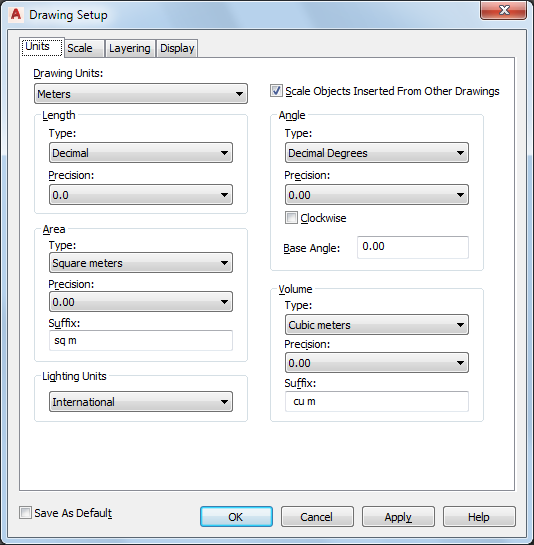
  • Units of measure and measurement style (UNITS)

AutoCAD Architecture 2023 Help | To Specify the Drawing Units | Autodesk

  • Drafting settings (DSETTINGS)
  • Layers and layer properties (LAYER)

Solved: AutoCAD Layer Properties Manager partially off screen - Autodesk  Community - AutoCAD

  • Linetype scale (LTSCALE)

AutoCAD LT 2023 Help | Linetype Manager | Autodesk

  • Dimension styles (DIMSTYLE)
  • Text styles (STYLE)
  • Layouts with layout viewports and scales (LAYOUT)
  • Plot and publishing settings (PAGESETUP)

When you save these settings as a drawing template file, you can start creating designs without having to first specify any settings.

Distribution board model: http://<div class=”sketchfab-embed-wrapper”> <iframe title=”010_-_ElKilp_Vaga_Lihtne-WEB-DWF” frameborder=”0″ allowfullscreen mozallowfullscreen=”true” webkitallowfullscreen=”true” allow=”autoplay; fullscreen; xr-spatial-tracking” xr-spatial-tracking execution-while-out-of-viewport execution-while-not-rendered web-share src=”https://sketchfab.com/models/e3271317c4d3481c96cbbde36cb12832/embed”> </iframe> <p style=”font-size: 13px; font-weight: normal; margin: 5px; color: #4A4A4A;”> <a href=”https://sketchfab.com/3d-models/010—elkilp-vaga-lihtne-web-dwf-e3271317c4d3481c96cbbde36cb12832?utm_medium=embed&utm_campaign=share-popup&utm_content=e3271317c4d3481c96cbbde36cb12832″ target=”_blank” rel=”nofollow” style=”font-weight: bold; color: #1CAAD9;”> 010_-_ElKilp_Vaga_Lihtne-WEB-DWF </a> by <a href=”https://sketchfab.com/jevgenikareva?utm_medium=embed&utm_campaign=share-popup&utm_content=e3271317c4d3481c96cbbde36cb12832″ target=”_blank” rel=”nofollow” style=”font-weight: bold; color: #1CAAD9;”> jevgenikareva </a> on <a href=”https://sketchfab.com?utm_medium=embed&utm_campaign=share-popup&utm_content=e3271317c4d3481c96cbbde36cb12832″ target=”_blank” rel=”nofollow” style=”font-weight: bold; color: #1CAAD9;”>Sketchfab</a></p></div>

Estonia: Use of national symbols or national motifs

The learner gets to know and uses national symbols or national motifs in the practical work of vocational education (e.g. tiler, painter, sewing).

As it is a creative and optional method, it is well received by learners and motivating for practical learning.

This method develops and consolidates being a citizen of one’s country, the learner’s self-determination competence.